Showing posts with label Sorting Arrays. Show all posts

Friday, 31 July 2015

As we have done a few lessons in arrays (parts one, two and three), let us learn how to find results in large arrays as well as look at 2-D arrays.

Searching Arrays

          Search array for a key value
          Linear search
        Compare each element of array with key value
          Start at one end, go to other
        Useful for small and unsorted arrays
          Inefficient
          If search key not present, examines every element


          Binary search
        Only used with sorted arrays
        Compare middle element with key
          If equal, match found
          If key < middle
        Repeat search on first half of array
          If key > middle
        Repeat search on last half
        Very fast
          At most N steps, where 2N    > # of elements
          30 element array takes at most 5 steps
25   >  30


Multiple Sub-scripted Arrays

          Multiple subscripts
        a[ i ][ j ]
        Tables with rows and columns
        Specify row, then column
        “Array of arrays”
          a[0] is an array of 4 elements
          a[0][0] is the first element of that array


          To initialize
        Default of 0
        Initializers grouped by row in braces
                             int b[ 2 ][ 2 ] = { { 1, 2 }, { 3, 4 } };

  
                             int b[ 2 ][ 2 ] = { { 1 }, { 3, 4 } };


          Referenced like normal
               cout << b[ 0 ][ 1 ];

        Outputs 0
        Should not be referenced using commas
                             cout << b[ 0, 1 ]; is interpreted as cout << b[1]

          Function prototypes
        Must specify sizes of subscripts
          First subscript not necessary, as with single-scripted arrays
        void printArray( int [][ 3 ] );


          Next: program showing initialization
        After, program to keep track of students grades
        Multiple-subscripted array (table)
        Rows are students
        Columns are grades


Arrays in C++ Part 4: Searching Arrays and 2-D Arrays

Tuesday, 28 July 2015

Now that we have gotten a grip over the basics of arrays ( part one and part two ), we will discuss some basic code examples involving arrays.

Strings:

Strings can be considered as arrays of characters;
     All strings end with null ('\0')
     Examples
        char string1[] = "hello";
       Null character implicitly added
       string1 has 6 elements
        char string1[] = { 'h', 'e', 'l', 'l',    'o', '\0’ };
     Subscripting is the same
string1[ 0 ] is 'h'
string1[ 2 ] is 'l'
      Input from keyboard
  char string2[ 10 ];
  cin >> string2;
     Puts user input in string
        Stops at first whitespace character
        Adds null character
     If too much text is entered then the data is written beyond array
      Printing strings
     cout << string2 << endl;
        Does not work for other array types
     Characters printed until null found

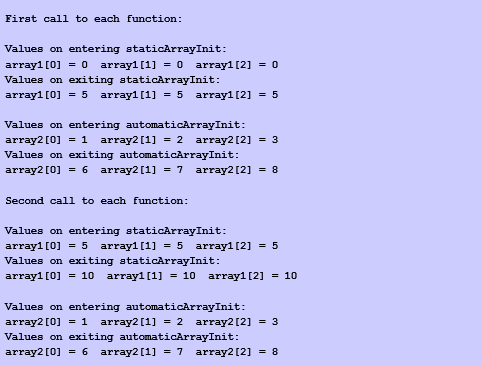
 This is shown in the examples below:


Static Arrays:

Recall static storage
–If static, local variables save values between function calls
–Visible only in function body
–Can declare local arrays to be static
•Initialized to zero
static int array[3];
If not static
–Created (and destroyed) in every function call


Sorting data using Arrays:

 Before getting into this example we should first know what Sorting data is, it is:
     An important computing application
     Virtually every organization must sort some data
        Massive amounts must be sorted
      Bubble sort
     Several passes through the array
     Successive pairs of elements are compared
        If increasing order (or identical), no change
        If decreasing order, elements exchanged
     Repeat these steps for every element
• Example:
        Go left to right, and exchange elements as necessary
          One pass for each element
        Original:   3  4  2  7  6
        Pass 1:      3  2  4  6  7   (elements exchanged)
        Pass 2:      2  3  4  6  7
        Pass 3:      2  3  4  6  7   (no changes needed)
        Pass 4:      2  3  4  6  7
        Small elements "bubble" to the top (like 2 in this example)
          Swapping variables
int x = 3, y = 4;
y = x;
x = y;
          What happened?
        Both x and y are 3!
        Need a temporary variable
          Solution
int x = 3, y = 4, temp = 0;
temp = x;  // temp gets 3
x = y;     // x gets 4
y = temp;  // y gets 3


Computing Mean, Mode and Median using Arrays:

First lets just look at what mean , median and mode actually are:
•Mean
–Average (sum/number of elements)
•Median
–Number in middle of sorted list
–1, 2, 3, 4, 5  (3 is median)
–If even number of elements, take average of middle two
•Mode
–Number that occurs most often
–1, 1, 1, 2, 3, 3, 4, 5 (1 is mode)
Now lets look at how we'll compute these.


Examples Using Arrays (Arrays Part three)

 
Codexify © 2015 - Designed by Templateism.com