Showing posts with label Courses. Show all posts

Wednesday, 12 August 2015

As you may remember from your lesson on arrays, we initially declared the size of the array in our code. However, what if, at run time, the user only wanted to enter five elements in the ten element array we declared? That would be a waste of space. Conversely, if our array is smaller than what the user wants, that would pose another problem. To overcome this, we use the concept of dynamic memory, where the array size is entered by the user during the running of the application.

Dynamic Memory

•          Until now, we have only had as much memory as we have requested in declarations of variables, arrays etc
•          The size of all of them was fixed BEFORE the execution of the program.
•          What if we need a variable amount of memory
•          That can only be determined DURING the program execution (runtime).
•          For example, in case that we need user input to determine the necessary amount of space?

The answer is dynamic memory
We can accomplish this using the operators new and delete

Operators "new" and "new[]"

•          new: to request dynamic memory
•          new is followed by a data type
•          and optionally the number of elements required within brackets [].
•          Returns a pointer to the beginning of the new block of assigned memory.
                pointer = new type // to assign memory to contain one single element of type
               or
               pointer = new type [elements]  // to assign a block (an array) of elements of type.

int * b;
b = new int[5];
•          The operating system will assign space for 5 elements of type int
•          And will return a pointer to its beginning
•          That has been assigned to b.
•          Therefore, now, b points to a valid block of memory with space for 5 int elements. 


Why use pointers as arrays?

•the size of an array must be a constant value
•Which limits its size to what we decide at the moment of designing the program before its execution
•Whereas the dynamic memory allocation allows assigning memory during the execution of the program
•using any variable, constant or combination of both

Dynamic Memory Implementation


•The dynamic memory is generally managed by the operating system
•Shared between several applications
•So there is a possibility that the memory exhausts.
•If so, the operating system cannot assign the memory that we request with the operator new
•A null pointer will be returned.
•For that reason it is recommended to always check to see if the returned pointer is null after a call to new. 

int * b;
   b = new int [5];
   if (b == NULL) {
       // error assigning memory. Take
     //measures.
   }; 

Operators "delete"

•          Once the dynamic memory is no longer needed it should be freed
•          So that it becomes available for future requests of dynamic memory.
•          The operator delete exists for this purpose
                delete pointer;
                or
               delete [] pointer;

•          The first expression should be used to delete memory allocated for a single element
•          The second one for memory allocated for multiple elements (arrays).
•          In most compilers both operators are equivalent

"new" and "delete"

Take a look at an example code to see the implementation of the operators:


Dynamic Memory and "new" and "delete" Operators

Monday, 10 August 2015

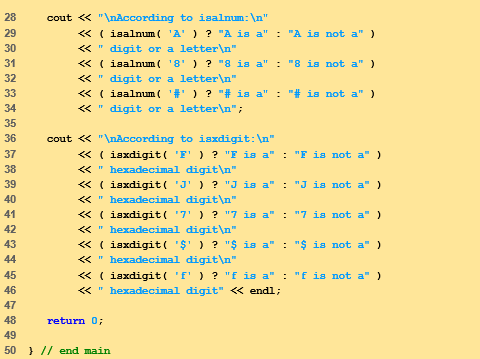
Last time we wrapped up the topic of Pointers and Strings , today we will have a look at <cctype> which is a very important and useful library in C++.

Character Handling Library or <cctype> is a library in C++
–        It has functions to perform tests and manipulations on characters
–       You pass character as argument
•          Character represented by an int
–        char does not allow negative values
•          Characters often manipulated as ints
•          EOF usually has value -1
•   In the upcoming example you will witness the usage of:
–        isalpha( int c )
•          (All character functions take int argument)
•          Returns true if c is a letter (A-Z, a-z)
•          Returns false otherwise
–        isdigit
•          Returns true if digit (0-9)
–        isalnum
•          Returns true if letter or digit (A-Z, a-z, 0-9)
–        isxdigit
•          Returns true if hexadecimal digit (A-F, a-f, 0-9)


Some other functions of the character handling Library are:
–        islower

•          Returns true if lowercase letter (a-z)
–        isupper
•          Returns true if uppercase letter (A-Z)
–        tolower
•          If passed uppercase letter, returns lowercase letter
–        A to a
•          Otherwise, returns original argument
–        toupper
•          As above, but turns lowercase letter to uppercase
–        a to A
–        isspace
•          Returns true if space ' ', form feed '\f', newline '\n', carriage return '\r', horizontal tab '\t', vertical tab '\v'
–        iscntrl
•          Returns true if control character, such as tabs, form feed, alert ('\a'), backspace('\b'), carriage return, newline
–        ispunct
•          Returns true if printing character other than space, digit, or letter
•          $ # ( ) [ ] { } ; : %, etc.
–        isprint
•          Returns true if character can be displayed (including space)
–        isgraph
•          Returns true if character can be displayed, not including space

 Some of these are better explained through there usage in the following example:


Character Handling Library

Saturday, 8 August 2015

Let us dive into part four of our lesson on pointers and strings. You can revise the previous three parts here, here and here.

Fundamentals of Characters and Strings

•          Character constant
–        Integer value represented as character in single quotes
–        'z' is integer value of z
•          122 in ASCII

•          String
–        Series of characters treated as single unit
–        Can include letters, digits, special characters  +, -, * ...
–        String literal (string constants)
•          Enclosed in double quotes, for example:
                                            "I like C++"
–        Array of characters, ends with null character '\0'
–        String is constant pointer
•          Pointer to string’s first character
–        Like arrays

•          String assignment
–        Character array
•          char color[] = "blue";
–        Creates 5 element char array color
–        last element is '\0'
–        Variable of type char *
•          char *colorPtr = "blue";
–        Creates pointer colorPtr to letter b in string “blue”
–        “blue” somewhere in memory
–        Alternative for character array
•          char color[] = { ‘b’, ‘l’, ‘u’, ‘e’, ‘\0’ };

•          Reading strings
–        Assign input to character array word[ 20 ]
                               cin >> word 
•          Reads characters until whitespace or EOF
•          String could exceed array size
                                            cin >> setw( 20 ) >> word;
•          Reads 19 characters (space reserved for '\0')

•          cin.getline
•          Read line of text
•          cin.getline( array, size, delimiter );
•          Copies input into specified array until either
•          One less than size is reached
•          delimiter character is input
•          Example
                             char sentence[ 80 ];
                             cin.getline( sentence, 80, '\n' );

String Manipulation Functions of String-handling Library

•          String handling library <cstring> provides functions to
–        Manipulate string data
–        Compare strings
–        Search strings for characters and other strings
–        Tokenize strings (separate strings into logical pieces)


•          Copying strings
–        char *strcpy( char *s1, const char *s2 )
•          Copies second argument into first argument
•          First argument must be large enough to store string and terminating null character
–        char *strncpy( char *s1, const char *s2,   size_t n )
•          Specifies number of characters to be copied from string into array
•          Does not necessarily copy terminating null character


•          Concatenating strings
–        char *strcat( char *s1, const char *s2 )
•          Appends second argument to first argument
•          First character of second argument replaces null character terminating first argument
•          Ensure first argument large enough to store concatenated result and null character
–        char *strncat( char *s1, const char *s2, size_t n )
•          Appends specified number of characters from second argument to first argument
•          Appends terminating null character to result


•          Comparing strings
–        Characters represented as numeric codes
•          Strings compared using numeric codes
–        Character codes / character sets
•          ASCII
•          “American Standard Code for Information Interchange”
•          EBCDIC
•          “Extended Binary Coded Decimal Interchange Code”

•          Comparing strings
–        int strcmp( const char *s1, const char *s2 )
•          Compares character by character
•          Returns
–        Zero if strings equal
–        Negative value if first string less than second string
–        Positive value if first string greater than second string
–        int strncmp( const char *s1,
                                                                 const char *s2, size_t n )
•          Compares up to specified number of characters
•          Stops comparing if reaches null character in one of arguments


•          Tokenizing
•          Breaking strings into tokens, separated by delimiting characters
•          Tokens usually logical units, such as words (separated by spaces)
•          "This is my string"  has 4 word tokens (separated by spaces)
•          char *strtok( char *s1, const char *s2 )
•          Multiple calls required
•          First call contains two arguments, string to be tokenized and string containing delimiting characters
•          Finds next delimiting character and replaces with null character
•          Subsequent calls continue tokenizing
•          Call with first argument NULL


•          Determining string lengths
•          size_t strlen( const char *s )
•          Returns number of characters in string
•          Terminating null character not included in length


Pointers and Strings: Part Four

 
Codexify © 2015 - Designed by Templateism.com