Showing posts with label Functions. Show all posts

Monday, 10 August 2015

Last time we wrapped up the topic of Pointers and Strings , today we will have a look at <cctype> which is a very important and useful library in C++.

Character Handling Library or <cctype> is a library in C++
–        It has functions to perform tests and manipulations on characters
–       You pass character as argument
•          Character represented by an int
–        char does not allow negative values
•          Characters often manipulated as ints
•          EOF usually has value -1
•   In the upcoming example you will witness the usage of:
–        isalpha( int c )
•          (All character functions take int argument)
•          Returns true if c is a letter (A-Z, a-z)
•          Returns false otherwise
–        isdigit
•          Returns true if digit (0-9)
–        isalnum
•          Returns true if letter or digit (A-Z, a-z, 0-9)
–        isxdigit
•          Returns true if hexadecimal digit (A-F, a-f, 0-9)


Some other functions of the character handling Library are:
        islower

          Returns true if lowercase letter (a-z)
        isupper
          Returns true if uppercase letter (A-Z)
        tolower
          If passed uppercase letter, returns lowercase letter
        A to a
          Otherwise, returns original argument
        toupper
          As above, but turns lowercase letter to uppercase
        a to A
        isspace
          Returns true if space ' ', form feed '\f', newline '\n', carriage return '\r', horizontal tab '\t', vertical tab '\v'
        iscntrl
          Returns true if control character, such as tabs, form feed, alert ('\a'), backspace('\b'), carriage return, newline
        ispunct
          Returns true if printing character other than space, digit, or letter
          $ # ( ) [ ] { } ; : %, etc.
        isprint
          Returns true if character can be displayed (including space)
        isgraph
          Returns true if character can be displayed, not including space

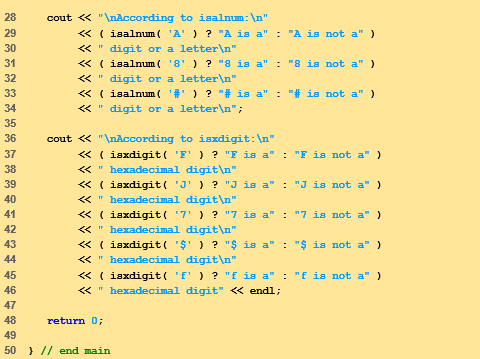
 Some of these are better explained through there usage in the following example:


Character Handling Library

Friday, 31 July 2015

As we have done a few lessons in arrays (parts one, two and three), let us learn how to find results in large arrays as well as look at 2-D arrays.

Searching Arrays

          Search array for a key value
          Linear search
        Compare each element of array with key value
          Start at one end, go to other
        Useful for small and unsorted arrays
          Inefficient
          If search key not present, examines every element


          Binary search
        Only used with sorted arrays
        Compare middle element with key
          If equal, match found
          If key < middle
        Repeat search on first half of array
          If key > middle
        Repeat search on last half
        Very fast
          At most N steps, where 2N    > # of elements
          30 element array takes at most 5 steps
25   >  30


Multiple Sub-scripted Arrays

          Multiple subscripts
        a[ i ][ j ]
        Tables with rows and columns
        Specify row, then column
        “Array of arrays”
          a[0] is an array of 4 elements
          a[0][0] is the first element of that array


          To initialize
        Default of 0
        Initializers grouped by row in braces
                             int b[ 2 ][ 2 ] = { { 1, 2 }, { 3, 4 } };

  
                             int b[ 2 ][ 2 ] = { { 1 }, { 3, 4 } };


          Referenced like normal
               cout << b[ 0 ][ 1 ];

        Outputs 0
        Should not be referenced using commas
                             cout << b[ 0, 1 ]; is interpreted as cout << b[1]

          Function prototypes
        Must specify sizes of subscripts
          First subscript not necessary, as with single-scripted arrays
        void printArray( int [][ 3 ] );


          Next: program showing initialization
        After, program to keep track of students grades
        Multiple-subscripted array (table)
        Rows are students
        Columns are grades


Arrays in C++ Part 4: Searching Arrays and 2-D Arrays

Thursday, 23 July 2015

Today we shall continue discussing functions in C++. You can check out parts one, two and three.

References and Reference Parameters

          Call by value
        Copy of data passed to function
        Changes to copy do not change original
        Prevent unwanted side effects
          Call by reference
        Called Function can directly access data of calling function
        Changes affect original
          Reference parameter
        Alias for argument in function call
          Passes parameter by reference
        Use & after data type in prototype
          void myFunction( int &data )
          Read “data is a reference to an int
        Function call format the same
          However, original can now be changed


          Pointers
        Another way to pass-by-reference
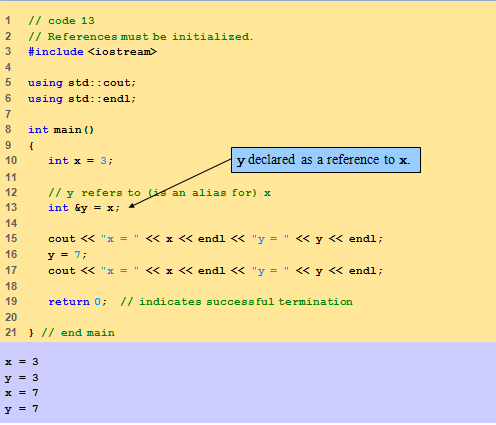
          References as aliases to other variables
        Refer to some variable and only one variable
          References must be initialized when declared
        Otherwise, compiler error


Default Arguments

•Function call with omitted parameters
–If not enough parameters, rightmost go to their defaults
–Default values
•Can be global variables, constants, expressions or function calls
•Set defaults in function prototype
  int myFunction( int x = 1, int y = 2, int z = 3 );
myFunction(3)
x = 3, y and z get defaults (rightmost)
myFunction(3, 5)
x = 3, y = 5 and z gets default


Unitary Scope Resolution Operator

•Unary scope resolution operator (::)
–Access global variable if local variable has same name
–Not needed if names are different
–Use ::variable
y = ::x + 3;
–Good to avoid using same names for locals and globals


Writing Functions in C++: Part 4

Tuesday, 21 July 2015

Continuing with the previous post, today we will further go into details about functions.

Attributes of  a Variable:

All variables have attribute,which include;
  and;
–Scope
•Where variable can be referenced in program
–Storage class

•How long variable exists in memory

Storage Classes:

Thee are two storage classes:
–Automatic

–Static

Automatic Storage Classes:

Automatic storage class are either auto or register
–Variable created when program enters block in which it is defined
–Variable destroyed when program leaves block
–Local variables of functions are automatic
•Automatic by default
•keyword auto explicitly declares automatic
register keyword
•Hint to place variable in high-speed register
•Good for often-used items (loop counters)
•Often unnecessary, compiler optimizes on its own
–Specify either register or auto, not both

register int counter = 1;

Static Storage Classes:

In static storage class;
–Variables exist for entire program
•For functions, name exists for entire program
–Not accessible outside one file, scope rules still apply
static keyword
–Local variables
–Keeps value between function calls
–Only known in own function
extern keyword
–Default for global variables/functions
•Globals: defined outside of a function block

–Known in any function that comes after it

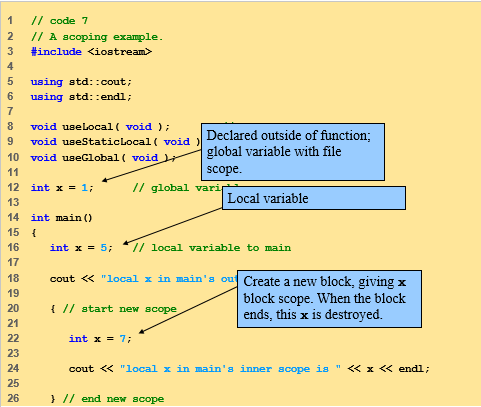
Scope Rules:

Scope is the portion of program where identifier can be used, it has further four categories
•File scope aka Global scope
–Defined outside a function, known in all functions
–Global variables, function definitions and prototypes
•Function scope
–Labels are the only identifiers with function scope
–Can only be referenced inside defining function
–Only labels, e.g., identifiers with a colon (case:)

–Labels used with ‘goto’ statement

•Block scope/Local scope
–Begins at declaration, ends at right brace }
•Can only be referenced in this range
–Local variables, function parameters
static variables still have block scope
•Storage class separate from scope
•Function-prototype scope
–Parameter list of prototype
–Names in prototype optional
•Compiler ignores
–In a single prototype, name can be used only once


Functions with Empty Parameter Rules:
In c++ we often encounter functions with Empty parameter lists;
void or leave parameter list empty
–Indicates function takes no arguments
–Function print takes no arguments and returns no value
void print();

void print( void );


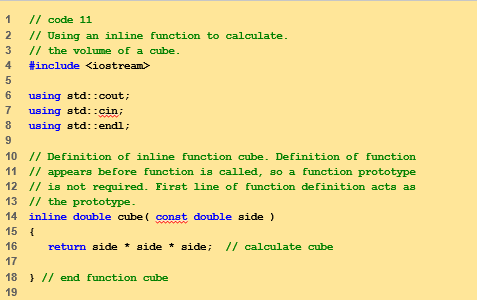
Inline Functions:
Inline functions are a very useful in programming, if we know where to use them; 
–Keyword inline before function
–Asks the compiler to copy code into program instead of making function call
•Reduce function-call overhead
•Compiler can ignore inline
–Good for small, often-used functions
•Example
inline double cube( const double s )
{ return s * s * s; }

const tells compiler that function does not modify s


Functions (Part 3)

 
Codexify © 2015 - Designed by Templateism.com